
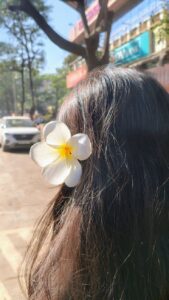
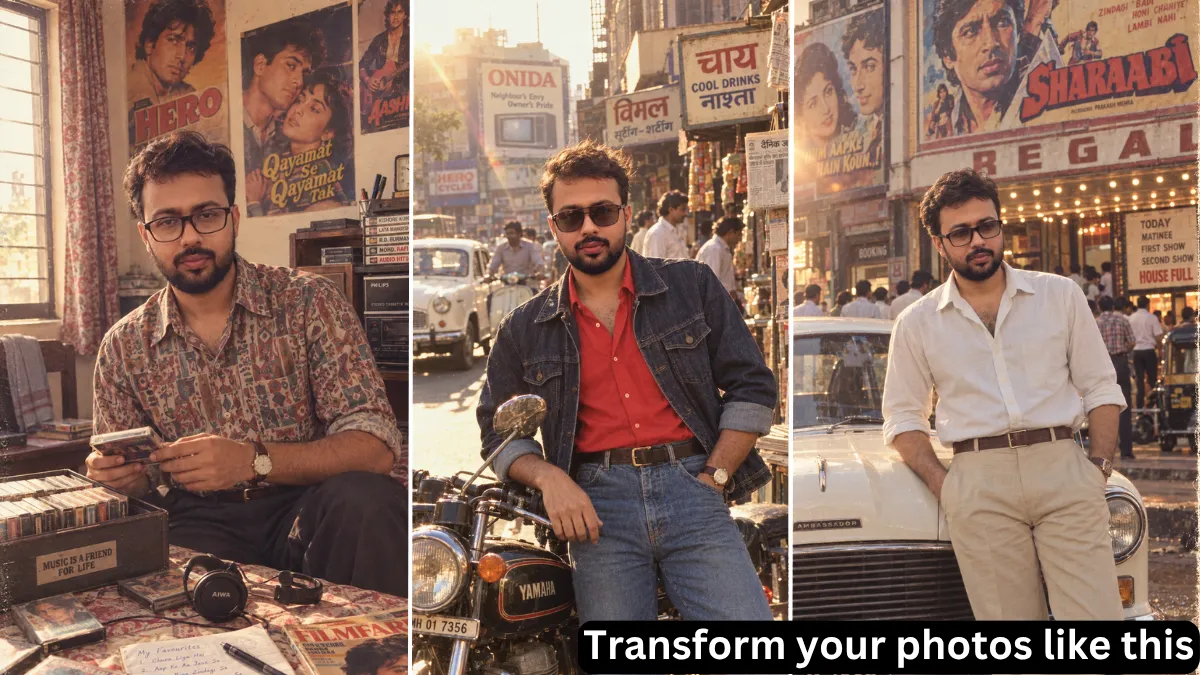
You’ve seen them all over Instagram — photos that look like they were pulled from a dusty family album in 1987. The soft film grain, the warm flash lighting, the feathered hair, the oversized blazers. That aesthetic is having a massive moment, and the best part? You don’t need a film camera or a time machine. You just need the right 1980s photo prompt.
Whether you’re using ChatGPT (DALL-E 3), Midjourney, or another AI image tool, the prompt is everything. Feed it vague instructions and you’ll get generic results. Feed it a well-structured, era-accurate prompt and you’ll get something worth sharing — something that genuinely looks like it was shot on 35mm film in the mid-eighties.
This guide breaks down exactly what makes a great 1980s photo prompt, gives you working templates you can copy today, and shows you how to adapt them across the most popular AI image tools. Let’s get into it.
Why the 1980s AI Photo Trend Is Dominating Social Media
The 80s AI photo trend isn’t just another passing filter. It exploded because it does something Instagram filters can’t: it doesn’t just colour your photo — it rebuilds your entire scene. Your hairstyle, your outfit, your background, your lighting, all transformed to feel genuinely authentic to the decade.
OpenAI even chimed in with a recommended prompt when the trend went viral, signaling just how mainstream it’s become. People aren’t just doing yearbook portraits anymore — they’re recreating family album shots, Bollywood film stills, VHS home video frames, and arcade snapshots. The variety is part of the appeal.
The key to joining in is understanding that a good retro photo prompt is really four separate jobs working together:
- Preserving your identity — your exact face, skin tone, and features
- Setting the era — hairstyle, clothing, accessories, and cultural context
- Reproducing the medium — the film stock, lighting, and grain of analogue photography
- Dating the shot — making it feel like the photo was taken in 1987, not a modern photo with an old filter
Miss any one of those and the result looks off. Nail all four and you get something genuinely impressive.
What Makes a Great 1980s Photo Prompt: The Core Elements
Before diving into copy-paste templates, it helps to understand the anatomy of a strong 1980s photo prompt. Each element serves a specific purpose and, together, they tell the AI exactly what to create.
Specify the Era and Sub-Aesthetic
“1980s” covers a wide range. A photo from 1982 looks different from one in 1988. The fashion, the film stocks, even the colour palettes shifted throughout the decade.
Be as specific as you can:
- “1984 high school yearbook” — Lifetouch studio portraits, laser grid backdrops, crisp but slightly washed-out colours
- “1987 arcade candids” — neon lights, on-camera flash, bold saturated colours, grainy
- “Early 80s home video” — VHS quality, scan lines, colour bleed, soft focus
OpenAI’s own recommended prompt leans into this specificity, anchoring the vision to a single year (1985) and building outward from there.
Name a Real Film Stock
This is the single most impactful thing you can add to any vintage photo prompt. Naming a real film stock — like Kodak Gold 200, Fuji Velvia, or Polaroid SX-70 — tells the AI exactly what colour rendering, grain texture, and tonal qualities to simulate.
Here’s what each popular choice does:
- Kodak Gold 200 — warm, slightly over-saturated, the classic mall portrait look
- Fuji Velvia — vivid, high contrast, bold primaries — great for fashion and street photography
- Kodak Ektachrome — slide film with rich, slightly cool tones
- Polaroid SX-70 — soft focus, slight green/yellow colour cast, instant camera feel
- 35mm Kodachrome — warm, fine grain, slightly desaturated — iconic documentary look
The more specific the film stock, the more authentic the result. Skip vague terms like “vintage film” and go for the real thing.
Describe the Lighting
Lighting sells the era as much as the fashion. 1980s photography had distinctive lighting styles depending on the genre:
- Direct on-camera flash — creates hard shadows, washed-out backgrounds, that classic snapshot look
- Soft studio umbrella flash — Lifetouch and yearbook portraits, warm and even
- Tungsten studio lighting — warm, slightly amber, flattering for studio portraits
- Mixed ambient and flash — the candid party photo feel, common in home photography
Adding a lighting description forces the AI away from the clean, perfectly-lit look of modern digital photography and into the more imperfect, characterful world of analogue.
Describe Period-Accurate Fashion and Hairstyles
This is where specificity pays off. Generic “80s clothing” prompts give you generic results. Specific details give you something that looks like a real photograph:
Hairstyles:
- Teased voluminous blowouts, feathered layers, perms
- Mullets (if going full authenticity), pompadours
- Scrunchies, headbands, side parts with volume
Clothing:
- Acid-wash denim, high-waisted everything
- Padded shoulder blazers, leather jackets
- Neon windbreakers, tracksuits, oversized tees
- For formal: power suits, bold ties, statement accessories
Props and setting details:
- CRT televisions, boomboxes, cassette players
- Wood-panelled walls, shag carpets
- Neon arcade cabinets, vintage automobiles
- VHS camcorders, Landline cord phones
These props anchor the scene in time. They stop the AI from drifting into an ambiguous “vintage” look and push it firmly into the 1980s.
Add Film Imperfections
Real film photographs aren’t perfect. Adding these descriptors to your prompt introduces the subtle imperfections that make an AI image feel genuine:
- “35mm film grain” or “authentic analog grain”
- “Light leaks” — the slight colour bleed where light hit the film incorrectly
- “Slightly faded colours” — film dyes shift over time
- “Soft focus” — organic lens softness, not the crispness of digital
- “Lens halation” — the glow around bright light sources
- “Subtle chromatic aberration” — colour fringing at edges
- “Film scratches” or “dust speckles” — the look of an old print
State What to Avoid
Negative prompts are underrated. Tell the AI what not to include:
- Smartphones, smartwatches, wireless earbuds
- LED lighting, modern cars, contemporary architecture
- Over-sharpness, HDR processing, beauty filters
- CGI rendering, cartoon aesthetics
This is especially important when transforming a modern photo — the AI needs to know it should replace the contemporary world with a period-accurate one, not just slap a filter on top.
Include an Identity Preservation Clause
When transforming your own photo, you need to explicitly protect your likeness. Without this, the AI may alter your face structure, skin tone, or features.
Your prompt should include something like:
“Keep my exact facial features, face shape, skin tone, and natural expression completely unchanged.”
Pair this with a high-quality, front-facing source photo taken in good lighting. The better your input photo, the more accurately the AI preserves your likeness.
Step-by-Step: How to Create a 1980s Photo with AI
Here’s the process that works across ChatGPT (DALL-E 3), Midjourney, and most other AI image tools:
1. Choose the right source photo. A clear, front-facing portrait in good lighting gives the AI the most to work with. Avoid heavily filtered photos, shots with sunglasses, or images with multiple people (unless your prompt handles group shots specifically). Minimum 800px wide if possible.
2. Open a new conversation. For each transformation, start fresh — this keeps context clean and prevents the AI from carrying over unwanted style decisions.
3. Upload your photo first, then the prompt. Send the image, wait for it to fully upload, then paste your prompt. Don’t send them simultaneously.
4. Paste your prompt. Use one of the templates below, or build your own using the elements from the previous section.
5. Review and refine. If the result is 80% there, refine rather than starting over. Target the specific thing that needs adjusting — “keep everything the same but change the backdrop to a laser grid yearbook studio.”
6. Generate a few versions. Even a perfect prompt has variance. Run it 2–3 times and pick the best result.
Copy-Paste 1980s Photo Prompts (That Actually Work)
These prompts are tested across DALL-E 3 and Midjourney. Feel free to copy them directly or adapt them to your needs. For each one, upload your photo first.
1. Classic Yearbook Portrait
Transform this photo into an authentic 1985 high school yearbook portrait. Keep my exact facial features, face shape, skin tone, and natural expression completely unchanged. Give me voluminous feathered hair and a period-appropriate outfit — collared shirt, oversized knit sweater. Set the background as a classic blue-and-magenta laser grid studio backdrop. Use warm soft studio flash lighting, subtle 35mm film grain, slightly muted colours, and natural imperfections. Make it look like a genuine Lifetouch photograph from the mid-1980s. Avoid modern digital sharpness or beauty filters.
2. Vintage Family Album Photo
Turn this photo into a warm 1980s family album photograph. Keep my face, identity, and natural expression recognisable. Give me period-appropriate clothing and hairstyling. Place me in a modest home setting — wooden furniture, patterned curtains, a vintage television, or a cassette player on a shelf. Use analogue film texture, slightly faded warm colours, natural lighting, mild grain, and the imperfect quality of an old printed photograph that has been stored in a family album. Do not make it look like a modern photo with a vintage filter.
3. VHS Home Video Frame
Make this photo look like a still frame from a home video recorded on a VHS camcorder in the late 1980s. Keep the subject recognisable. Add subtle scan lines, analogue noise, colour bleeding, soft focus, slight motion blur, and the characteristic low-resolution look of VHS footage. Use the warm, slightly washed-out colour palette typical of consumer camcorders from 1987. Include period-accurate elements like a CRT television or vintage living room in the background. Avoid sharp focus or modern image quality.
4. Neon Arcade Night Shot
Reimagine this photo as a candid night photograph outside a 1980s arcade. Keep me recognisable and preserve my facial structure. Change my clothing and hairstyle to match 1980s street fashion — acid-wash denim, a leather jacket, retro sneakers. Add neon signs glowing pink and cyan, colourful reflections on wet pavement, and a slightly underexposed dark background. Use direct on-camera flash for the subject and ambient neon glow for the environment. Add authentic 35mm film grain, slight colour bleed, and the grainy quality of a film camera shot at night in 1987.
5. Studio Portrait with Film Emulation
Transform this photo into a classic 1980s studio glamour portrait. Keep my facial features, identity, and natural expression recognisable. Give me an authentic 1980s hairstyle and a stylish period outfit. Use dramatic studio lighting with warm tungsten tones, soft shadows, and a slightly hazy background. Apply Kodak Gold 200 film grain emulation, subtle colour fading, and gentle light leaks at the edges. Make it resemble a professionally developed analogue photograph from the mid-1980s — polished but with the natural imperfections of film. Avoid modern digital sharpness, HDR processing, or plastic-looking skin textures.
6. Travel/Holiday Snapshot
Turn this photo into a casual 1980s holiday photograph. Keep my identity and facial features recognisable. Give me period-appropriate holiday clothing — a relaxed shirt, shorts or casual trousers, comfortable shoes. Place me in a realistic travel setting from the decade — a beach, a market, or a historical landmark with period-accurate surroundings. Make the photograph feel spontaneous rather than staged. Use natural sunlight, analogue film texture, mild grain, slightly faded warm colours, and imperfect framing typical of personal photographs from the era. Avoid a polished, overly composed shot.
Platform-Specific Tips
ChatGPT (DALL-E 3)
ChatGPT with DALL-E 3 is the easiest entry point for most people. The interface handles image-to-image transformation naturally — just upload your photo and paste the prompt.
Tips:
- Select HD quality before generating for sharper results
- Keep prompts concise within the chat interface — DALL-E 3 handles ambiguity well without needing walls of text
- If your face looks slightly off, re-prompt in the same conversation with: “Keep everything exactly the same, but restore my facial features closer to the original reference photo.”
Midjourney
Midjourney gives you more creative control and tends to produce the most photorealistic retro results, but it requires a few extra steps for image-to-image work.
Steps:
Sample structure:[image-url] classic 1985 studio portrait, feathered hair, acid-wash denim jacket, Kodak Gold 200 film grain, soft studio flash, subtle color fading, period-accurate 1980s setting --iw 2 --ar 4:5 --style raw --no cartoon illustration
Google Gemini
Gemini handles the transformation workflow similarly to ChatGPT — upload the photo, then describe the 1980s look you want in natural language. Its strength is conversational refinement: you can keep tweaking the result in the same thread without regenerating from scratch.
Common Mistakes to Avoid
Vague prompts. “Make this look 80s” is the fastest route to a mediocre result. The more specific your prompt, the better the output. Name the film stock, describe the lighting, and specify the era’s fashion details.
Forgetting to preserve your face. The single most common disappointment is the AI changing your facial structure. Always include an explicit identity preservation clause and use a high-quality source photo.
Starting over instead of refining. If a result is close, iterate. Change one element at a time — the backdrop, the outfit, the lighting — rather than throwing everything out and starting fresh. The best prompts often come from a few rounds of refinement.
Over-processing with AI alone. Some tools like Remini, Epik, and Photoleap have built-in 80s yearbook filters that work well for quick results. For the most authentic look, a well-written prompt in DALL-E or Midjourney will outperform one-click filters — but post-processing in Snapseed or Lightroom can add that final layer of analog warmth (slightly warm colour temperature, a touch of grain, a subtle fade).
Ignoring anachronisms. AI can slip in modern elements — a contemporary car in the background, a modern lamp, a too-sharp digital look. Add explicit negative constraints to avoid this.
Taking Your 1980s Photo Further: Post-Processing
A strong prompt gets you 90% of the way there, but a little manual editing can elevate your image from “very good” to “actually blew up my notifications”:
- Warm up the colour temperature — push it slightly yellow/amber to mimic aged film
- Lift the blacks — a subtle fade effect mimics the slightly washed-out look of old prints
- Add grain — even if your AI already added film grain, a pass in Lightroom or Snapseed lets you control the texture more precisely
- Check the details — AI still struggles with hands, text on clothing, jewellery, and background signage. Fix these manually if they look off.
For sharing on Instagram, placing your original photo next to the 1980s version (original left, retro right) in Canva or your phone’s editor is the format that’s been driving the most engagement. Use the “Add Yours” sticker in your Story to invite others to join the trend.
The Anatomy of a Perfect 1980s Photo Prompt: Quick Reference
| Element | What to Include | Example |
|---|---|---|
| Identity | Face preservation clause | “Keep my exact facial features unchanged” |
| Era | Specific year or sub-decade | “Mid-1985 studio portrait” |
| Film stock | Real film name | “Kodak Gold 200 film grain” |
| Lighting | Period-specific lighting style | “Direct on-camera flash, soft shadows” |
| Fashion | Specific clothing and accessories | “Acid-wash denim jacket, padded shoulders” |
| Hairstyle | Named 1980s style | “Voluminous feathered blowout” |
| Setting | Period-accurate environment | “Neon arcade, wood-panelled living room” |
| Imperfections | Film flaws | “35mm grain, light leaks, faded colours” |
| Negatives | What to exclude | “No smartphones, no modern sharpness” |
Final Thoughts
The 1980s photo prompt trend works so well because the decade has such a distinct, recognisable aesthetic. The bold fashion, the saturated film stocks, the specific lighting — all of it creates a visual signature that’s immediately legible. When you feed that specificity into an AI image tool, it doesn’t just add a filter; it rebuilds the entire photograph in a different time.
The difference between a mediocre result and a viral one almost always comes down to prompt detail. The tools are accessible to everyone. What separates the pack is knowing how to write for them.
Start with one of the six templates above, refine based on the results, and you’ll have something worth sharing in minutes. If you’ve got a specific 1980s vision in mind that the templates don’t cover, drop it in the prompt structure from the reference table and you’ll be surprised how well it translates.
Happy prompt writing — and good luck with your 1987 self.